 The next stop in this series of posts is your App-V Sequencing machine, in this case I will be running the sequencer as a virtual machine running in Hyper-V with a snapshot created to restore back to a clean machine quickly if needed.
3. Get the App-V sequencing going (but in a particular way)
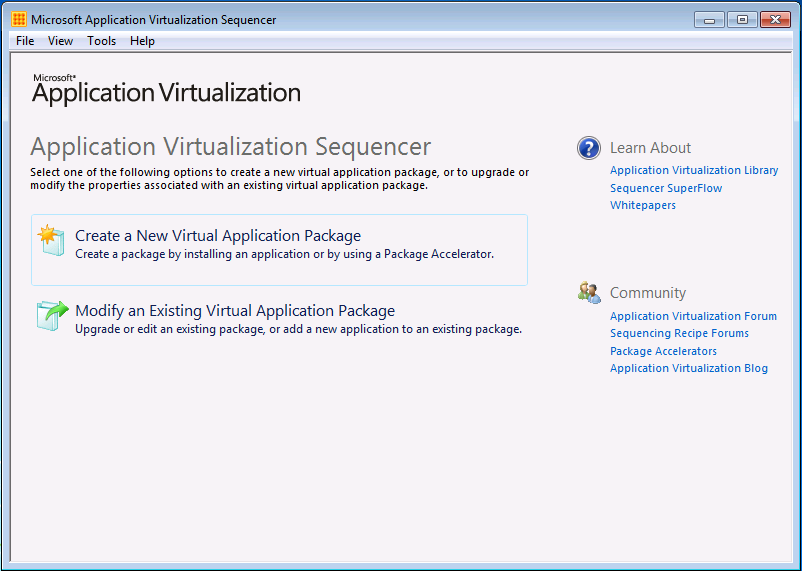
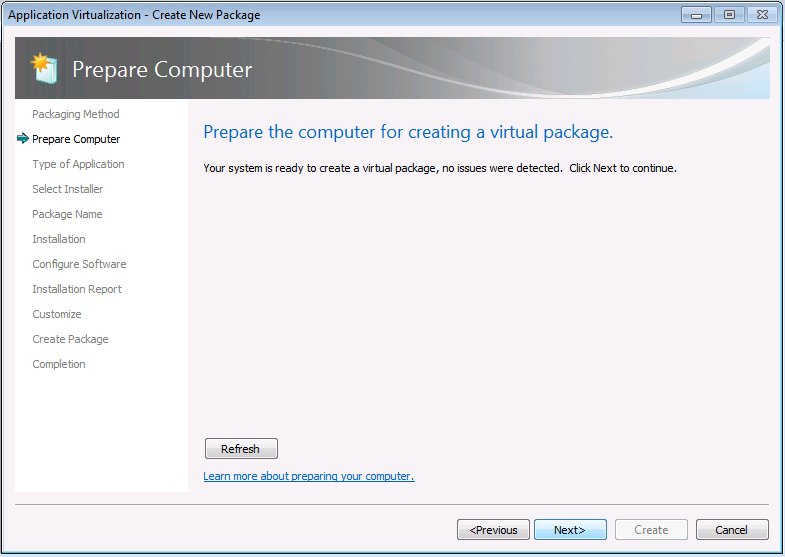
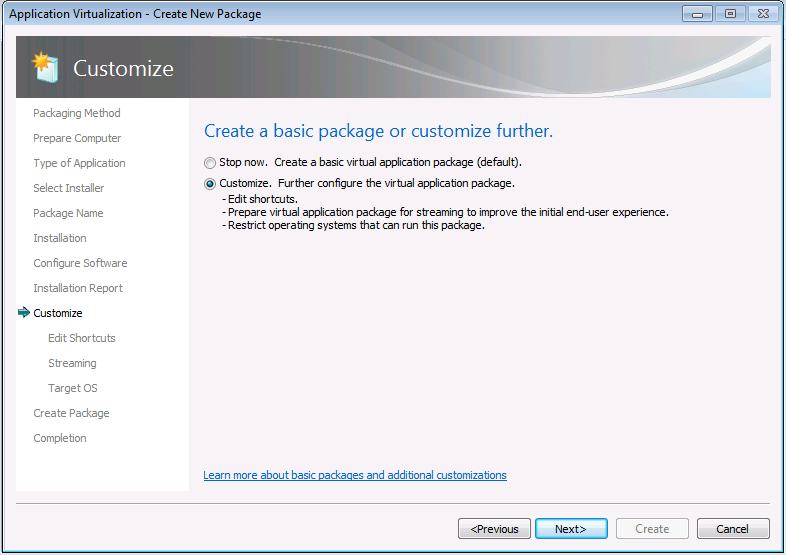
Getting your Adobe software through the sequencer isn’t that much different from most other programs, the basics are you run a silent installer, include an additional folder in the Q drive (that one with the licence file/serialization file in) and also add something into the OSD file which activates Adobe each time you run it.
One thing you will need is a little bit later on is a snippet of script which I have put below to make it easy to copy/paste in.
 CS6 Serial Code (241 bytes, 3,319 hits)
Everything else you need is in the screen shots below 🙂






4. Editing the OSD and adding in a script
This is the bit where the script above comes in handy so pay attention to where it goes and everything will be fine


5. Upload to App-V server and deploy
If you have gotten this far then you should know how to upload a package to your App-V server so I’ll leave you to do that in peace and move onto the next post in this serie
Hi,
I’m sequencing Adobe CS6 on the new App-V Beta 2. As you know osds have been replaced. After sequencing you get two config files which I guess are the equivalent of .osds. One is DeploymentConfig & the other UserConfig. Do you know where you insert the script & in which one should it go into? DeploymentConfig? UserConfig? Couldn’t find Dependency tags in either of them. Can it go anywhere or should it be in a particular spot?
Thanks,
LN.
Hey there,
Is this App-V 5.0 we are talking about or 4.6 SP2 (which is in Beta) as I thought it wasn’t until V5 that things change big time?
Cheers,
James
This is App-V 5 Beta2. No osds. There’s one file of each created upon sequencing. .appv, .msi, DeploymentConfig.xml, UserConfig.xml, report.xml. The DeploymentConfig.xml resembles the osd. But just need to clarify if & where I can insert the script. Any help would be appreciated.
Thanks,
LN.
BTW I can’t insert any attachments or screen shots here. I could’ve send you some screenshots.
Ahh I haven’t had much of a look at App-V 5 as yet – something on my long list of things to look into.
All the same there must be a way to run a file at runtime of the application.
When I add the pre-launch script into the OSD file, Photoshop icon does not show despite refreshing the client, but when I remove the pre-launch script from the OSD, it still does not launch then as well, comes up with the PDapp.exe Application Error. I have installed all the Visual C++ Redistributable components on both the sequencer and the client machine. Thanks S
Have you got the Visual C++ components on the sequencer before capture?
Hi, i installed all the c++ components on the sequencer. Thanks, S
Where do I paste this script in DeploymentConfig.xml in App-V 5.0?
Q:\CS6-Flash\CS6-Flash-Serial\AdobeSerialization.exe adobe_prtk ––tool=VolumeSerialize ––provfile=Q:\CS6-Flash\CS6-Flash-Serial\prov.xml
In App-V 4.6 this would go between the dependency tags. But where should I include it in App-V 5.0 – where within DynamicConfig.xml?
Is it here under User Scripts? What should I eliminate from here to paste my script?
– <!–
VFS\ProgramFilesX86\App\dosomething.exe
-WithArgs
[{AppVPackageRoot}]\Contoso\ContosoApp.EXE
VFS\ProgramFilesX86\App\UnDoSomething.exe
-WithArgs
[{AppVPackageRoot}]\Contoso\ContosoApp.EXE
[{AppVPackageRoot}]\VFS\ProgramFilesX86\App\DoSomething.exe
-WithArgs
[{AppVPackageRoot}]\VFS\ProgramFilesX86\App\UnDoSomething.exe
-WithArgs
\\server\share\foobar.exe
-WithArgs
\\server\share\barfoo.exe
-WithArgs
–>
Hi,
In App-V 4.6, to add a script, we’d open the relevant .osd file & add it under the dependency tags.
In case of App-V 5.0, this is an example of CS6-Flash_DeploymentConfig.xml
– <!–
VFS\ProgramFilesX86\App\dosomething.exe
-WithArgs
[{AppVPackageRoot}]\Contoso\ContosoApp.EXE
VFS\ProgramFilesX86\App\UnDoSomething.exe
-WithArgs
[{AppVPackageRoot}]\Contoso\ContosoApp.EXE
[{AppVPackageRoot}]\VFS\ProgramFilesX86\App\DoSomething.exe
-WithArgs
[{AppVPackageRoot}]\VFS\ProgramFilesX86\App\UnDoSomething.exe
-WithArgs
\\server\share\foobar.exe
-WithArgs
\\server\share\barfoo.exe
-WithArgs
–>
Where would I insert this script & how?
C:\CS6-Flash\CS6-Flash-Serial\AdobeSerialization.exe adobe_prtk ––tool=VolumeSerialize ––provfile=C:\CS6-Flash\CS6-Flash-Serial\prov.xml
I placed the AdobeSerialization.exe & Prov.xml inside the package in the “AppData” folder.
Then placed the script in the “Adobe Dreamweaver CS6_UserConfig.xml” under:
Like this:
[{AppData}]\Adobe\CS6-Serialization\AdobeSerialization.exe
adobe_prtk –tool=VolumeSerialize –provfile=[{AppData}]\Adobe\CS6-Serialization\prov.xml
[{ProgramFilesX86}]\Adobe\Adobe Dreamweaver CS6\Dreamweaver.exe
you can test it local with powershell
PS C:\> Set-ExecutionPolicy RemoteSigned -Scope Process -Force
PS C:\> Set-AppvClientConfiguration -EnablePackageScripts 1
PS C:\> Add-AppvClientPackage -Path ‘Share\APPV5\Adobe Dreamweaver CS6.appv’
PS C:\> Publish-AppvClientPackage -PackageId xxx-xxx-xxx-xx -VersionId xxx-xxx-xxx-xx -DynamicUserConfiguration Path ”Share\APPV5\Adobe Dreamweaver CS6_UserConfig.xml’
make sure that all the redist are installed!
Was trying to do and getting as Return code 1 . Any clue ..
Command Line Error. 😛
Thanks for your guide.
However, when I run the serialization tool as described pre-launch, as an administrator the script is being executed and after that Illustrator (per example) starts.
When I run it as an ordinary user, a pop-up from Adobe-ID shows you should activate with the correct ID before the next 32767 days.
What did I do wrong, and better, how can I fix it? 🙂
Thanks in Advance,
Emiel
Have you turned off command prompt access for your normal users by group policy?
Thank you for your reply.
Yes, normal users can use a command prompt. I’ve verified that the return code = 0, both as admin as a normal user. But the pop-up shows for a normal user and not for an administrator.
Emiel
Most odd – could you try updating your script using the one that I’ve now posted as a txt document download, others have mentioned before that the ” marks don’t always show up correctly.
UserScripts
StartProcess RunInVirtualEnvironment=”true”
Path[{AppData}]\Adobe\CS6-Serialization\AdobeSerialization.exe/Path
Argumentsadobe_prtk –tool=VolumeSerialize –provfile=[{AppData}]\Adobe\CS6-Serialization\prov.xml/Arguments
Wait RollbackOnError=”true”/
ApplicationId[{ProgramFilesX86}]\Adobe\Adobe Dreamweaver CS6\Dreamweaver.exe/ApplicationId
/StartProcess
/UserScripts
sorry i did not realized that the brackets “” where missing during posting
Thank you James
With you guide i succesfull installed CS6-Illustrator. The only problem i got was that is got the Pdapp.exe error after sequencing.
I installed all the c++ components before sequencing. But it still failed at startup. When i checked the event logs, the manifest version didnt match with the version in the sequence.
So what i had to do was after image 16, i had to copy the local manifest and replace them with the sequence manifest.
Hi, Thank You, it’s work very well with grant user but not working with standard user.
I get error with rights.
Do you know how to fix it?
First place to check is that your normal users can run command prompt scripts.
Did anyone manage to get this to work with App-V 5.0. I can sequence the app, get the serialization tool to run but all i get is return code 25, no valid product found. This happens even if i run the package manually.
thanks!
AdobeSerialization.exe –tool=VolumeSerialize –provfile=prov.xml gives error code 25. We are running Xendesktop 7.1 MCS. (Adobe Packaged with App-v 5/SP2)
Running this command on sequencing server returns 0 – installation tied to machine ?