
If you have ever tried to boot a VirtualBox VM into PXE (Microsoft WDS/MDT based) using the default Intel PRO/1000MT Desktop adapter you may have seen the error message
FATAL: Could not read from the boot medium! System halted.
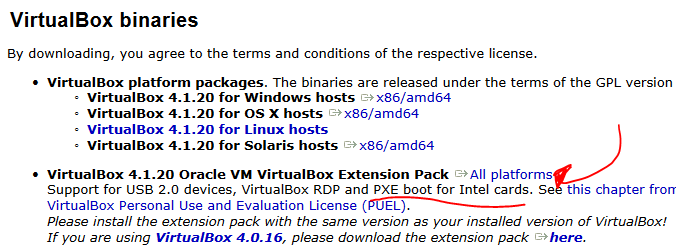
The simple solution to this problem (and to get you booting into WDS) is to install the VirtualBox extension pack which can be found on the same download page as the VirtualBox installer (link).
This extension pack includes the required files for boot to continue normaly, a few screen shots are shown below detailing what you need to do.



Does not work … After WDS loads the image (white progress bar completes) there is a reboot and there again I have the “No Bootable medium found!”
Thanks James, your post helped me out! WDS now works flawlessly in my lab.
Cheers!
Great to know it helped!
Many thanx.
It works fine now.
Thanks James it finally worked. Thanks a ton…:)
You the man! Wasn’t having the same exact issue but this resolved it. I was getting the boot image selection screen but it was failing after that with “no connected devices found” or something like that.
This still helps in 2019 with 6.0.4. Thanks, lad. You’re a lifesaver.