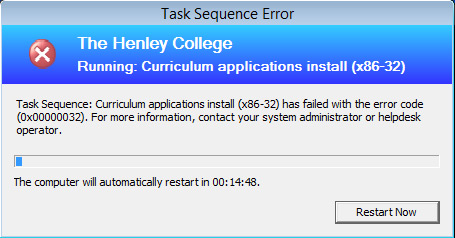
 A bit of a silly one this time round but when running a deploy/capture (with application installation half way through) SCCM 2012 task sequence just after installing the applications I got the error message.
Task sequence: <task sequence name> has failed with the error code (0x00000032). For more information, contact your system administrator or helpdesk operator.
As it turns out at the end of my application deployment phase of the task sequence I had a restart listed, however instead of being set to ‘The currently installed default operating system’ I had it set to ‘The boot image assigned to this task sequence’.
Setting this correctly to ‘The currently installed default operating system’ resolved the problem and I was back on my merry way to creating an updated OS deployment image.
I’d been struggling with this error for a while. This explains everything, thanks for you post.
Nice one, really helped, has an element of RTFM!
School boy error!
Awesome thanks for the help!!! Great blog btw, adding it to bookmarks.
Cheers!
Something completely unrelated to this, Just out of curiosity, Are you the James Preston who used to work at OSA by any chance?
Yes, Yes I am 🙂
haha… What a coincidence!! I work at OSA now and I’ve just recognised your name. As we still get letters/publications comes through to your name.
anyway, the reason i ended up here is because I was having issues with sccm and had the exact same error. I’ve just made the change you suggested and let’s see if it works.
I know they say the world too small. Who knew the internet is too..
Very cool! Here with Sam at IPExpo today he said this was probably you 🙂
been scratching my head for a few hours with this one, i added a restart in my TS and never checked this setting, once changed it sailed through….muchas gracias Gringo!!
Thanks great help
Task Sequence fails in error 0x0000032 in enable bitLocker. But, when I created another from scratch Task Sequence with the same applications everything pass. No errors at all.